Ir directamente al contenido

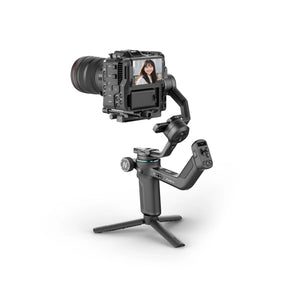
Feiyu SCORP-C2

USD $249.00 USD $211.65 Guardar 15%
Los gastos de envío se calculan en la pantalla de pago.
  • Mejorado con seguimiento de IA integrado para grabación en solitario sin manos
  • Compatible con configuraciones de cámaras DSLR de hasta 3.5 kg / 7.7 lbs
  • Controles intuitivos con botones y pantalla OLED
  • Conexión dual por cable y Bluetooth
  • Configuración rápida para grabación vertical
  • Sistema de liberación rápida mejorado
  • Control de joystick suave y sensible
  • Perilla multifunción para precisión creativa
  • 14H de autonomía máxima

Las cámaras controladas mediante un cable que no sea Type-C requieren el cable de control opcional de Feiyu para garantizar la compatibilidad.

Select Option: SCORP-C2
Lista de compatibilidad, manual y tutoriales
Lista de comparación
Información del Producto

Order Processing

United States, European Union, United Kingdom and Canada: Orders are typically processed within 1–2 business days.

Other countries or regions: Orders are usually processed within 2–3 business days.

Please note:
Order processing times may be extended during peak seasons or unforeseen circumstances.


Deliverable Shipping Destinations

For Orders Over USD $90

We offer Free Standard Shipping to the United States, Canada, the United Kingdom, and most European countries.
For orders shipped to countries or regions outside our local warehouses, any additional shipping fees will be calculated and displayed at checkout after you enter your shipping address. You can also view estimated shipping costs directly on the Shopping Cart page before completing your order.

Area Ship To Ship From Carrier Delivery Time Shipping Fees
North America United States US Warehouse USPS, UPS, etc. 3-5 business days Free
Canada CA Warehouse Canada Post, Intelcom, UPS, etc. 3-5 business days Free
Mexico China Warehouse DHL, FedEx, UPS 10-12 business days Additional shipping fees
Europe Austria, Belgium, Bulgaria, Cyprus, Czechia, Denmark, Estonia, Finland, France, Germany, Greece, Hungary, Ireland, Italy, Latvia, Lithuania, Luxembourg, Malta, Netherlands, Poland, Portugal, Romania, Slovakia, Slovenia, Spain, Sweden DE Warehouse UPS, DPD, DHL, An Post, La Poste, Poste Italiane, PostNord, BPost, etc. 5-10 business days Free
United Kingdom UK Warehouse Royal Mail, FedEx, etc. 3-5 business days Free
Norway, Switzerland, Croatia, Iceland, Ukraine, Monaco, San Marino, Belarus, Jersey, Guernsey,Las Palmas (ES), Santa Cruz de Tenerife (ES), Ceuta (ES), Melilla (ES), Åland Islands (FI) China Warehouse DHL, FedEx, UPS 10-12 business days Additional shipping fees
Asia South Korea, Philippines, Indonesia, Singapore, Japan, Hong Kong, Macao, Malaysia, Vietnam, Pakistan, Nepal, Bangladesh, Sri Lanka China Warehouse DHL, FedEx, UPS, SF Express 6-8 business days Additional shipping fees
Oceania Australia, New Zealand, Fiji China Warehouse DHL, FedEx, UPS 7-12 business days Additional shipping fees
The Middle East United Arab Emirates, Turkey, Saudi Arabia China Warehouse DHL, FedEx, UPS 7-12 business days Additional shipping fees
Israel, Lebanese, Iran China Warehouse DHL, FedEx, UPS 7-12 business days Additional shipping fees
South America Brazil, Peru, Colombia, Ecuador, Chile, Uruguay, Panama, Paraguay, Argentine China Warehouse DHL, FedEx, UPS 10-12 business days Additional shipping fees
Africa Algeria, Morocco, Ghana, Mozambique, South Africa China Warehouse DHL, FedEx, UPS 10-12 business days Additional shipping fees
Others Most Countries or Regions China Warehouse DHL, FedEx, UPS, EMS 10-12 business days Additional shipping fees

*Delivery times may vary depending on product availability and warehouse location.


For Orders Below USD $90

Packages containing only accessories or low-value items may require additional time for delivery. If you need expedited shipping due to special circumstances, please contact our customer service at store@feiyu-tech.com or use the online chat window for assistance.

Ship To Ship From Carrier Delivery Time Shipping Fees
United States, Canada, United Kingdom, Austria, Belgium, Bulgaria, Cyprus, Czechia, Denmark, Estonia, Finland, France, Germany, Greece, Hungary, Ireland, Italy, Latvia, Lithuania, Luxembourg, Malta, Netherlands, Poland, Portugal, Romania, Slovakia, Slovenia, Spain, Sweden US/CA/UK/DE Warehouse USPS, DHL, FedEx, UPS, etc. 3-10 business days Free
China Warehouse EUB, PostNL Estimated 2-3 weeks Free
Other Countries or Regions China Warehouse DHL, FedEx, UPS Estimated 8-12 business days Additional shipping fees
EUB, PostNL Estimated 2-3 weeks Additional shipping fees

Please note:

1. For orders shipped to the United States, Canada, the European Union, and the United Kingdom:
If any product or accessory is out of stock at the local warehouse, or if the shipping address falls outside the local warehouse's delivery coverage, those products will be shipped separately from our China warehouse. In such cases, delivery may take longer than the estimated timeframe.

2. A personal tax identification number is required for shipments to South Korea and South American countries such as Brazil, Chile, Argentina, Colombia, and Peru, in order to facilitate customs clearance and ensure successful delivery.

3. We currently offer shipping to most countries and regions worldwide. Please note that delivery to P.O. Boxes, APO, and FPO addresses is not supported.

4. Due to logistical constraints, orders to certain regions or countries in Europe will be shipped from our China warehouse, including but not limited to Las Palmas (ES), Santa Cruz de Tenerife (ES), Ceuta (ES), Melilla (ES), the Åland Islands (FI), Croatia, and Switzerland. Please refer to the table above for further details.


Order Status

🔹 Order Cancellation

You may cancel physical items or orders that have not yet entered the shipping process. Please contact our Customer Service Team at store@feiyu-tech.com within 24 hours of placing your order.

🔹 Shipping Address Change

For address changes, please contact our Customer Service Team at store@feiyu-tech.com with your updated shipping information. Once your order has been shipped, we are unable to modify the shipping address. 

🔹 Order Tracking

Once your order has been shipped, you will receive a shipping confirmation email with the tracking number and a link to track your package.


Shipping and Delivery

🔹 Shipping Fees

We offer Free Standard Shipping on all orders to the US, Canada, the EU, and the UK. For orders to other countries or regions, applicable shipping fees will be automatically calculated and shown on the checkout page after you enter your shipping address.

🔹 Delivery Time

For US, CA, EU, UK Orders:

We prioritize shipping from local warehouses for faster delivery. If the purchased product is out of stock in the local warehouse, it will be shipped from our China warehouse.

  • Orders Under $49: Products shipped from the China Warehouse may take 2–3 weeks to arrive.
  • Orders Above $50: Products shipped from the China Warehouse have an estimated delivery time of 7–10 business days (please note that actual delivery time may vary based on the logistics company).

For Orders from Other Countries or Regions:

  • Orders Under $49: Products will be shipped from the China Warehouse, with an estimated delivery time of 2–3 weeks.
  • Orders Above $50: Products will be shipped from the China Warehouse, with an estimated delivery time of 7–10 business days (please note that actual delivery time may vary based on the logistics company).

🔹 Remote Address Orders

Orders with remote locations will take longer time to arrive and additional shipping fees may be required. Please note that both delivery time and shipping fees depend on the address provided at checkout. You can calculate the estimated shipping fees on the Cart page.

🔹 Shipping Delays or Issues

While we strive to provide timely and reliable shipping services, unforeseen circumstances or external factors may cause delays or issues that are beyond our control. We kindly ask for your understanding and patience in such situations.

If you encounter any problems or have concerns regarding your shipment, please contact our customer support team, and we will do our best to assist you 


Customs and Duties Notice

⚠️🟦 All international orders may be subject to customs duties, taxes, or import fees as determined by the destination country. These charges are not included in your order total or shipping fees. FeiyuTech is not responsible for any additional costs incurred, including on discounted or promotional items. All such fees are the sole responsibility of the recipient.

⚠️🟦 If a package is returned due to unpaid customs duties, a refund will not be issued.

⚠️🟦 By placing an order, you authorize FeiyuTech to handle the import process on your behalf and allow us to delegate this process to a third-party service provider if necessary.

Please note that we cannot guarantee whether or not duties will be charged, as they are assessed by the customs authority based on the declared value of the product upon arrival.


Other Questions

If you have any questions, please email us at store@feiyu-tech.com or contact us directly in the chat window.

At FeiyuTech, customer satisfaction is our top priority. If a product does not meet your expectations, you may request a full refund or replacement in accordance with the conditions outlined below.


Return & Refund

If you would like to apply for a return and refund, please request refund within 30 calendar days of receiving your product. To avoid any delay or denial of processing your refund request, please verify that the product for return satisfies all of our following inspection criteria.

Return & refund service available on following conditions

🔹 Within 30 calendar days of receiving the product.

🔹 If the product is damaged or destroyed during shipping, please provide us with clear images, videos or certificate of damage provided by the logistics company.

🔹 The type or appearance of the product is found to be incorrect, or obvious manufacturing defects, such as appearance defect, are found on the product without being put to use.

🔹 The product cannot properly function under the instructions or the guidance of our Support Team, or is malfunctioning due to non-artificial reasons.

🔹 The product is still in a perfect resellable condition, and includes all original accessories (the packaging, batteries, complimentary, manuals, etc.).

🔹 The product is not compatible with your smartphones or cameras, which are not included in the official compatible list.

Please note:

Customers need to pay for the return shipping unless the return is due to product quality issues.

Within 30 calendar days of receipt, customers can return the product(s) with no reason. Beyond 30 calendar days of receipt, Feiyu might not accept returns for any reason. If there are any product quality issues, please request Return & Refund within 30 calendar days of receipt.

Return & refund service unavailable on following conditions

🔹 The refund is requested beyond 30 calendar days of receipt.

🔹 Unable to provide the invoice of purchase or the receipt, or try to forge or alter the receipt.

🔹 The label or machine code of the product is altered or obliterated.

🔹 The packaging, manuals, original and complimentary accessories of the product are incomplete or damaged.

🔹 The main part or the accessories of the product are damaged due to artificial reasons (scratches, dents, etc.), and will affect the second sales of the product.

🔹 Any fault or damage has been caused by unauthorized use or modification of the product, including collision, exposure to moisture, entry of foreign materials (seawater, sands, muds, etc.), burning down, improper installation or operation against the instructions.

🔹 The product is damaged by force majeure, including fires, floods, high winds, lightning strikes, traffic accident, etc.

🔹 The product and relevant objects haven't been sent back to us within 7 calendar days after the return confirmation is sent from FeiyuTech.

Return & refund process

STEP 1: Please email us at store@feiyu-tech.com for return type confirmation, including your name, order number, product name, and the images or videos that can prove the damage or destroy of the product.

STEP 2: Our Support Team will provide RMA/warehouse/service center address for you to ship back the product.

STEP 3: After your shipping the product, our Support Team will arrange refund to you in 3-5 working days.


Replacement Policy

If you would like to apply for a replacement, please request replacement within 30 calendar days of receiving your product. To avoid any delay or denial of processing your replacement request, please verify that the product for replacement satisfies all of our following inspection criteria.

Replacement service available on following conditions

🔹 Within 30 calendar days of receiving the product.

🔹If the product is damaged or destroyed during shipping, please provide us with clear images, videos or certificate of damage provided by the logistics company.

🔹 The type or appearance of the product is found to be incorrect, or obvious manufacturing defects, such as appearance defect, are found on the product without being put to use.

🔹 The product cannot properly function under the instructions or the guidance of our Support Team, or is malfunctioning due to non-artificial reasons.

🔹 The product is not compatible with your smartphones or cameras, which are not included in the official compatible list.

Please note:

Customers need to pay for the return shipping unless the return is due to product quality issues.

Within 30 calendar days of receipt, customers can replace the product(s) with no reason. Beyond 30 calendar days of receipt, Feiyu might not accept replacement for any reason. If there are any product quality issues, please request Replacement within 30 calendar days of receipt.

Replacement service unavailable on following conditions

🔹 The replacement is requested beyond 30 calendar days of receipt.

🔹 Unable to provide the invoice of purchase or the receipt, or try to forge or alter the receipt.

🔹 The return product does not match the order information.

🔹 The label or machine code of the product is altered or obliterated.

🔹 The main part or the accessories of the product are damaged due to artificial reasons (scratches, dents, etc.), and will affect the second sales of the product.

🔹 The product is found to have no quality issues after being thoroughly inspected by FeiyuTech’s after-sales department.

🔹 Any fault or damage has been caused by unauthorized use or modification of the product, including collision, exposure to moisture, entry of foreign materials (seawater, sands, muds, etc.), burning down, improper installation or operation against the instructions.

🔹 The product is damaged by force majeure, including fires, floods, high winds, lightning strikes, traffic accident, etc.

🔹 The product and relevant objects haven’t been sent back to us within 7 calendar days after the replacement confirmation is sent from FeiyuTech.

Replacement process

STEP 1: Please email us at store@feiyu-tech.com for replacement confirmation, including your name, order number, product name, and the images or videos that can prove the damage or destroy of the product

STEP 2: Our support team will provide RMA/warehouse/service center address for you to ship back the product.

STEP 3: After your shipping the product, our support team will arrange the replacement to you in 7 working days.

Warranty

FeiyuTech Official Store offers a One-year Warranty for all products purchased directly from our official store. Please note that the warranty period may vary by region in accordance with local laws and regulations. If you have any questions, feel free to contact us at store@feiyu-tech.com.

Note: In accordance with EU consumer protection laws, a Two-year Warranty is provided for orders shipped to EU countries.


Free maintenance service conditions

🔹 Within one year from the purchase date, the product is malfunctioning under normal usage due to non-artificial reasons.

🔹 The malfunction of the product is not caused by artificial reasons such as unauthorized disassemble, conversion or addition.

🔹 Provide the certificate of maintenance service: the warranty card (with customer information, purchase date and the code of the product), the legitimate receipts, invoices or screenshot of purchasing.


Paid maintenance service conditions

🔹 Unable to provide legitimate receipts, invoices or the warranty card.

🔹 The product has been overused, operated against the instructions, or damaged by improper installation, assemble, storage, transit or carrying.

🔹 The product is malfunctioning due to being used under the environments that are not included in the intrusion, such as high-temperature and leakage of seawater and sands.

🔹 The product is malfunctioning due to improper storage, improper charging, discharging of the battery or using the batteries of other brands.

🔹 The product is malfunctioning due to the incompatibility of the third-party accessories that are not recommended by the FeiyuTech.

🔹 The product is damaged by misuse that exceeds its bearing limits.

🔹 The product is damaged by force majeure, including fires, floods, lightning strikes, traffic accident and so on.

* FeiyuTech reserves the right of final interpretation on the above after-sales terms and conditions.


Maintenance Process

STEP 1: To request maintenance service, Please email us at support@feiyu-tech.com / service@feiyu-tech.com. In your email, kindly describe the issue with the product and include your relevant order information.

STEP 2: Ship the malfunctioning product to us along with the warranty card. Please ensure you keep a backup of your personal settings prior to sending the product.

STEP 3: Upon receipt of the product, our Support Team will assess the issue and proceed with the necessary repairs. The repair and testing process typically takes 7 working days.

STEP 4: Once the repair is complete, we will promptly return the fully repaired product to you.

Actualizado con módulo de seguimiento de IA integrado

No se requieren accesorios ni aplicaciones adicionales: el SCORP-C2 se basa en el SCORP-C original con un módulo integrado mejorado de seguimiento facial por IA. Detecta rostros rápidamente con un campo de visión un 15% más amplio y una mayor precisión de reconocimiento. Solo enciéndelo y empieza a grabar.
Con una distancia máxima de seguimiento de hasta 18 metros, es perfecto para escenas concurridas o dinámicas, y garantiza que tu rostro permanezca perfectamente encuadrado en todo momento.

Control por gestos, reconocimiento inteligente

Con cinco controles gestuales integrados, puedes iniciar o detener el seguimiento, grabar y personalizar tu encuadre. Incluso cuando grabas en solitario, se siente como si tuvieras a un camarógrafo personal con IA a tu lado.

Palma abierta

Disparar / Grabar

Gesto OK

Iniciar / Detener seguimiento facial

Pulgares en dirección opuesta

Iniciar/Detener seguimiento

Gesto Doble En Forma De L

Enmarcado personalizado

Double pulgares arriba

Desactiva el control por gestos

Interruptor vertical rápido, sin accesorios adicionales requeridos

Gracias a su diseño modular, la cámara y el deslizador de montaje se pueden desmontar y girar 90°, y luego fijarse rápidamente en el brazo vertical, lo que permite grabación vertical nativa en un solo movimiento fluido. Perfecto para crear contenido para redes sociales sin necesidad de accesorios adicionales.
Además, la perilla de ajuste de precisión del eje de inclinación permite un ajuste fino a nivel milimétrico, dándote un equilibrio perfecto en cada toma.

Asa integrada para correa para disparos versátiles y en ángulo bajo

No hacen falta accesorios adicionales: el SCORP-C2 incorpora un asa integrada tipo empuñadura que se adapta de forma natural a la palma de la mano. Cambia de ángulo al instante para tomas a baja altura, seguimientos creativos o movimientos en ángulo alto con total facilidad. El diseño ergonómico reduce la fatiga y te da mayor libertad de movimiento para un control suave y cinematográfico en cualquier situación de grabación.

Carga útil mejorada: de 2.5 KG a 3.5 KG

SCORP-C2 aumenta la capacidad de carga de 2.5 kg/5.5 lbs a unos potentes 3.5 kg/7.7 lbs, lo que te permite transportar con facilidad configuraciones de cámara DSLR y sin espejo más pesadas o grandes. Perfecto para videos cortos, vlogs y grabaciones profesionales, ofreciendo a los creadores más flexibilidad y libertad que nunca.

Controles de botones para principiantes

Toma el control con el SCORP-C2 mejorado, que cuenta con un joystick suave y botones ubicados de forma intuitiva para un manejo fluido con una sola mano. Diseñado para creadores de todos los niveles, el sistema de control perfeccionado hace que cambiar de modo, ajustar ángulos y capturar tomas cinematográficas sea más fácil que nunca. Tanto si eres principiante como profesional, el SCORP-C2 pone la precisión y la comodidad al alcance de tu mano.

Unlock Control Intuitivo con Feiyu SCORP APP

Conecta SCORP-C2 a la app Feiyu SCORP por Bluetooth para disfrutar de un control del gimbal intuitivo y preciso directamente desde tu smartphone.

Ajusta la potencia del motor, cambia los modos de seguimiento, controla los movimientos de paneo/inclinación/rotación y selecciona escenarios de grabación creativos: Timelapse, Auto Rotation (Inception), Panorama, Portrait Mode o Selfie Mode, todo desde la app.

Con el Somatic Remote Mode, los sensores de movimiento integrados de tu teléfono permiten un control suave y preciso de los tres ejes del gimbal. Esta función transforma tu smartphone en un control remoto basado en movimiento, brindándote un manejo intuitivo y manos libres a distancia.

Modos de Escenario Creativo

Rotación automática (Inception)

lapso de tiempo

Panorama

Enhanced Control y Estructura Mejorada

Bloqueo de 3 ejes con diseño de hebilla

Los tres bloqueos de eje se han mejorado, pasando de un diseño con perilla a un diseño de hebilla rápida para un equilibrio y almacenamiento más rápidos.

Botón de memoria de trayectoria de punto A/B

Predefine dos puntos (A y B) para rutas de movimiento de cámara con velocidad, ángulo y tiempo de permanencia personalizables. Reproducción con un solo toque para replicar sin esfuerzo movimientos cinematográficos profesionales.

Control rápido de cámara Bluetooth

Empareja tus cámaras sin espejo DSLR Sony, Canon y Nikon mediante Bluetooth. Empieza a grabar o activa el enfoque al instante con una sola pulsación del botón del obturador.

Perilla electrónica multifunción

Perilla de sensor magnético de alta precisión con amortiguación ajustable. Permite un control preciso de la rotación del eje, el follow focus o el zoom, ofreciendo una experiencia de manejo fluida y profesional.

Versátiles opciones de accesorios

El puerto de expansión de 1/4" en el brazo de la empuñadura te permite añadir fácilmente accesorios como cámaras de acción, luces, micrófonos y monitores, lo que abre más posibilidades creativas de grabación.

Camera Compatibility List

For more details about supported camera control features and control cables, please refer to Cable Control Camera Compatibility PDF Document.
Cameras controlled via a non-Type-C cable require Feiyu optional control cable for compatibility.

BrandsModels
SonyA7II, A7III, A7IV, A7V, A7R, A7RII, A7RIII, A7RIV, A7RIVA, A7RV, A7S, A7SII, A7SIII, A7C, A7CII, A7CR, A6400, A6500, A6600, A6700, RX10III, RX10IV, A9, A9II, A9III, A1, FX3, ZV-1, ZV-1II, ZV-E1, ZV-E10, ZV-E10II, etc.
Canon200D II(250D), 850D, 80D, 90D, 6D Mark II,  5D Mark III,  5D Mark IV, 5DS R, M50, M50 Mark II, R5 Mark II, M6 Mark II, RP, R5, R6, R6 Mark II, R6 Mark III, R7, R8, R10, R50, R50 V, R5C, R100, Powershot G7 X Mark III, M200, R100, PowerShot V10, PowerShot V1, etc.
NikonZR, Z30, Z50 II, Z50, Z f, Z fc, Z8, Z7 II, Z7, Z6 III, Z6 II, Z6, Z5 II, Z5, D7500, D850
PanasonicGH6, GH5S, GH5, GH4, G9 II, G9, S5 II, S5, S9, S1H
FujifilmX-T20, X-T30,X-T30 II, X-T50, X-T100, X-T200, X-A5, X-A7, X-T3, X-T4, X-T5, X-M5, X-S10,X-S20, X-E3, GFX 100S, X-H1, X-H2S, X-H2, X100V, X100VI
SIGMAFP
BlackmagicBMPCC 6K, BMPCC 4K

Please note: Gimbal Payload refers to the maximum weight the axis motors can support. The actual balancing performance may vary depending on the camera body shape, lens size, and weight distribution. To check if your specific lens can be balanced, please refer to the Lens Compatibility List or contact us at store@feiyu-tech.com.

Compare Products

Specification Feiyu SCORP-C2

Feiyu SCORP-C2

USD $211.65
SCORP-C de pie sobre una superficie plana usando el soporte específico Scorp Kickstand

Feiyu SCORP-C

USD $229.00
alt
Scorp 2 se mantiene en una superficie plana usando el caballete específico Scorp

Feiyu SCORP 2 (Ship to US ONLY)

USD $199.00
Tipo de producto - - -
Dispositivos compatibles - - -
Peso del gimbal - - -
Carga útil máxima - - -
Duración de la batería - - -
Control del estabilizador - - -
Diseño de agarre integrado No desmontable No desmontable No desmontable
Seguimiento de IA integrado 15 % de vista de seguimiento más amplia
Tiempo de respuesta de 0.003 s
Distancia de seguimiento de hasta 18 metros
- La distancia de seguimiento es de 8 metros
Bloqueos del Eje Diseño de hebilla Diseño de perilla Diseño de la perilla
Luces indicadoras - - -
Control de la app - - -

General

Compatible Devices

Sony, Canon, Panasonic, Nikon, Fujifilm, SIGMA, Blackmagic Design cameras (check camera compatibility lists for more details)

Dimensions

250*176*345mm (gimbal balanced position)
299*66*253mm (gimbal folded position)

Weight

About 1320g/2.91lbs (tripod and other accessories and camera not included)

Payload

About 3500g/7.72lbs (well balanced)

Controllable Range

Tilt: +180°~-52°
Roll: +45°~-45°
Pan: 360° (unlimited)

Rotatable Range

Tilt: 320° (with limitation)
Roll: 320° (with limitation)
Pan: 360° (unlimited)

Material of Main Body

Synthetic macromolecular resin, aluminum alloy

AI Tracking

Built-in AI tracking module, enabling tracking and gesture control functions without the need for an app or accessories.

Quick Release Plate

Camera quick release plate (123.8x37.85x14mm) and camera backing base (60x38x10.6mm) are compatible with ARCA quick release system.
Can be removed from the gimbal together with the camera, and fast switch between popular quick release systems without re-assembling the camera.

Battery

Capacity

4500mAh, built-in, charged via the USB-C port below the multifunction knob.

Operating Voltage

6.8V-8.4V

Theoretical Battery Life

14H (working status)

Charging Time

≤3H (using 18W fast charger)

APP

Name

Feiyu SCORP

Required Operating System

iOS V13.0 or later
Android V10.0 or later

In the Box

SCORP-C2:
Feiyu SCORP-C2 Gimbal*1,
USB 2.0 to USB-C Charging Cable*1, USB Type-C to Type-C Cable*1,
Tripod*1, Slider*1, Camera L-Bracket Base*1, Upper Quick Release Plate*1, Lens Support Bracket*1, Lens Support Screw*1, Camera Mounting Screw*1, Hex Key*1

Preguntas frecuentes

1. ¿Mi cámara y objetivo son compatibles con el SCORP-C2?

SCORP-C2 es compatible con cámaras de Sony, Canon, Nikon, Panasonic y Fujifilm. Para consultar la compatibilidad detallada con tu cámara y lente específicas, revisa nuestra Lista de Compatibilidad.

2. ¿Cómo usar la función de seguimiento de IA?

Sigue estos pasos para usar la función de seguimiento por IA:
1) Enciende el módulo de seguimiento por IA:
Haz triple clic en el botón F1 para activar el módulo de seguimiento por IA.
2) Activa el seguimiento:
Colócate frente al sensor del módulo de IA a una distancia de 1–3 meters y haz el gesto de “OK”. Cuando el seguimiento se active correctamente, el indicador se pondrá en verde.
Como alternativa, colócate frente al sensor del módulo de IA y mantén pulsado el botón F1 para activar el seguimiento.
3) Sal del seguimiento:
Puedes detener el seguimiento usando cualquiera de los siguientes métodos:

  • Colócate frente al sensor del módulo de IA a una distancia de 1–3 meters y haz un gesto con ambos puños y los pulgares apuntando uno hacia el otro.
  • Colócate frente al sensor del módulo de IA y mantén pulsado el botón F1.
  • Colócate frente al sensor del módulo de IA y vuelve a hacer el gesto de “OK”.

    Nota: Para detener el seguimiento con el gesto de “OK”, espera al menos 3 segundos después de iniciar el seguimiento con el gesto de “OK”.
3. ¿Qué debo hacer si el seguimiento con IA no responde al intentar activarlo?

1) Reinicia la IA o el gimbal: Apaga y vuelve a encender la opción AI Power, o reinicia el gimbal.
2) Comprueba el modo de seguimiento: Asegúrate de que el gimbal esté actualmente en modo de seguimiento con IA. Si no es así, vuelve a cambiar al modo de seguimiento con IA.
3) Comprueba las condiciones de iluminación: Los entornos extremadamente oscuros o demasiado brillantes pueden afectar el rendimiento del seguimiento. Evita usar el seguimiento con IA en esas condiciones.

4. ¿Cómo forzar el apagado del estabilizador?

Para forzar el apagado del gimbal, asegúrate de que no esté conectado a un cargador. Luego, mantén presionados simultáneamente el botón FPV y el botón del interruptor de función de la perilla.

5. ¿Cómo desvincular la conexión Bluetooth del teléfono y la conexión inalámbrica del mango con el gimbal?

Empuja el joystick hacia abajo y pulsa tres veces el botón de encendido del mango del control remoto simultáneamente. Luego reinicia el gimbal.

Nota: Después de desvincular el Bluetooth del gimbal, también debes eliminar manualmente el registro de emparejamiento en tu teléfono.

6. ¿Cómo desvincular el Bluetooth entre el estabilizador y la cámara?

Empuje el joystick hacia arriba y pulse tres veces el botón de encendido del mango remoto simultáneamente.

Nota: Después de borrar el emparejamiento en el gimbal, también debe eliminar manualmente el registro de emparejamiento en la cámara.

7. ¿Qué debo hacer si el eje del gimbal gira automáticamente?

Si los ejes giran automáticamente debido a cambios en el entorno o a un uso incorrecto (p. ej., rotación del eje de paneo en modo Bloqueo o desalineación grave del paneo):

Método 1: Primero, cambie a un modo que no sea FPV. Luego deslice de derecha a izquierda en la pantalla principal, seleccione Ajustes del gimbal > Calibración horizontal > Calibración automática. Déjelo quieto durante unos segundos para completar la calibración.

Método 2: Asegúrese de que el gimbal esté correctamente equilibrado y fijo. Encienda el gimbal. Pulse cinco veces el botón M del asa remota para iniciar la calibración automática.

Nota: Durante la calibración, el gimbal entrará en modo de suspensión. Mantenga el gimbal inmóvil hasta que se complete la calibración. Tras una calibración correcta, el gimbal se reactivará automáticamente.

8. ¿Qué hacer si el eje de balanceo del gimbal no está nivelado?

Primero, cambia a un modo que no sea FPV. En la pantalla principal, desliza de derecha a izquierda y selecciona Configuración del estabilizador > Calibración horizontal. Luego gira manualmente la rueda de ajuste o arrastra en la pantalla táctil para nivelar el eje de balanceo.

Nota: En modo FPV, la calibración manual no actualizará el ángulo del eje de balanceo en tiempo real.

9. ¿Cuál es la distancia máxima de control de la app Feiyu Scorp?

Feiyu SCORP App: 12 metros (probado en áreas abiertas; el alcance real se ve afectado por el entorno y los dispositivos).

10. ¿Qué hacer si los motores del gimbal no funcionan después de encenderlo?

1) Asegúrese de que los tres bloqueos del motor del gimbal estén desbloqueados y de que los tres ejes estén correctamente equilibrados. Luego, intente presionar el botón de encendido para volver a encender el gimbal.

2) Acople correctamente el Remote Handle al gimbal y pulse cinco veces el botón M del mango para realizar la calibración automática.

3) Si el nivel de batería del gimbal está por debajo del 10% al iniciarse, entrará en modo de suspensión. En este caso, cárguelo por completo antes de usarlo.

11. ¿Por qué el estabilizador entra automáticamente en modo de suspensión, y qué debo hacer?

Modo de suspensión: los tres ejes pierden energía, y el icono de intensidad del motor en la esquina superior izquierda de la pantalla táctil muestra una luna gris.

Motivo ① : El gimbal se encendió sin estar correctamente equilibrado, lo que activó el mecanismo de protección contra sobrecarga; o los bloqueos del motor no estaban desbloqueados, lo que hizo que el gimbal entrara en Modo de suspensión.

Solución: Verifique y asegúrese de que todos los ejes estén correctamente equilibrados. Asegúrese de que todos los bloqueos del motor estén completamente desbloqueados. Pulse el botón de encendido del gimbal para activarlo y, a continuación, ajuste adecuadamente la potencia del motor antes de usarlo.

Nota: Haga doble clic en el botón de encendido del gimbal para entrar manualmente en el Modo de suspensión. Pulse una vez el botón de encendido, o toque el icono de la luna en la pantalla táctil, para activarlo manualmente.

Motivo ② : Si el nivel de batería del gimbal es inferior al 10% al iniciarse, entrará automáticamente en Modo de suspensión.

Solución: Cargue completamente el gimbal antes de usarlo.

12. ¿Qué debo hacer si el estabilizador no tiene energía o muestra un error E5 al encenderlo?

1) Comprueba el equilibrio y los bloqueos de los motores: Asegúrate de que la cámara esté correctamente equilibrada en los tres ejes y de que todos los bloqueos de los motores estén desbloqueados. Luego, intenta reiniciar el gimbal.
2) Calibra automáticamente el gimbal: En la empuñadura, pulsa cinco veces el botón M para realizar la calibración automática.

13. ¿Qué significan los mensajes en pantalla E2~E5?

E2 indica la protección contra el funcionamiento en vacío del mango.

E3 indica la protección contra sobrecarga.

E4 indica vibración del gimbal.

E5 indica un error interno del gimbal (incluida la falla de inicialización, incompatibilidad de firmware).

Carrito 0

Su carrito está vacío.

Empieza a comprar
} if (filteredClassName === "67b59b22e669c-35105141-591739954978") { // } if (filteredClassName === "trust_key") { // } } } } } (function addBadgesArray() { if(timeArr.length === 0) { let objs = setInterval(() => { let _state = 1; let badgesArr = document.querySelectorAll('[class^="giraffly-trust-badge-"]'); for(let i =0; i< badgesArr.length; i ++) { if(badgesArr[i].childNodes.length === 0) { _state = 0; } } if(badgesArr && badgesArr.length > 0 && _state === 0) { setBadgesBlock(badgesArr); } }, 1000) timeArr.push(objs); } })() // 确保找到了匹配的元素 if (elementIds && elementIds.length > 0) { setBadgesBlock(elementIds); } // (function addListenSvg() { let logClick = 0; if (typeof jQuery !== "undefined") { const observer = new MutationObserver((mutationsList, observer) => { if (jQuery('.giraffly-right-Bar-Preview-Example').length > 1 && logClick === 0) { if (jQuery('.giraffly-right-Bar-Preview-div-svg').length > 0) { jQuery('.giraffly-right-Bar-Preview-div-svg').each((i, ele) => { let ltag = jQuery(ele).find('linearGradient'); if (ltag.length > 0) { ltag.each((inx, elem) => { let idObj = jQuery(elem).attr('id'); let formatText = i + '_' + inx + '_' + idObj; jQuery(ele)[0].innerHTML = jQuery(ele)[0].innerHTML.replace(new RegExp(idObj, 'g'), formatText); }); logClick = 1; observer.disconnect(); } }); } } }); observer.observe(document.body, { childList: true, subtree: true }); } else { setTimeout(() => { addListenSvg(); }, 1000); } })();